How to Play Clone Hero Multiplayer: Local, Online & Friend Setup
Clone Hero multiplayer is easiest when every player agrees on the game version, the chart files and the connection method before anyone presses Start. This guide separates local play from online play, explains the current v1.1 host and join flow, and gives you a short troubleshooting path for missing players, missing songs or a session that will not begin.
Yes, but the setup depends on where the players are
Clone Hero supports multiplayer play in the current v1.1 release. If everyone is in the same room, local play is the simplest route: connect the instruments or controllers to one computer, map each input and select a compatible mode. If friends are in different locations, use the game's multiplayer host and join flow, then choose an automatic host, a direct connection or the relay option described in the official online multiplayer guide.
Before testing a session, update through the Clone Hero update guide, launch one chart locally and make sure each player has the same chart available. Multiplayer problems are often library or input problems that only become visible after the connection is already working.
Is Clone Hero multiplayer?
Yes. The important distinction is between playing together on one machine and connecting separate installations over a network.
The official v1.1 release added a current multiplayer path alongside other online features. The exact buttons and service behavior can change with future builds, so use the publisher's v1.1 release notes as the feature reference when a menu label differs from this guide. This page focuses on the decisions that remain useful: who is hosting, how each player joins, which content must match and where to look when a song will not start.
A multiplayer room does not automatically provide a song library. Each participant still needs a playable copy of the chart, its metadata and its audio. If a song works for the host but is unavailable to another player, finish the shared-library check before changing router settings. For chart installation, use the song installation guide and run Scan Songs on each computer.
| Situation | Best first choice | What must be ready |
|---|---|---|
| Same room, one computer | Local multiplayer | All controllers connected and mapped to one game instance |
| Friends in different locations | Online host and join | A current build, matching chart files and a reachable host or relay |
| Testing whether the game works | One-player local chart | A known-good song before adding network complexity |
| Comparing published scores | Leaderboard workflow | A separate verified run; multiplayer play is not the same as score submission |
Choose local or online multiplayer
Local multiplayer gives you the shortest feedback loop. You can see every controller, hear the same audio output and fix an input mapping without involving a firewall or a remote connection. It is also the best first test after an update because a local chart confirms that the game, audio and song path work together.
Online multiplayer is more convenient for distant friends but has more variables. The host's game must be reachable, every participant needs a compatible chart, and a version mismatch can look like a connection problem. If your group is new to Clone Hero, complete one local test and write down the chart title, instrument and difficulty before inviting everyone.
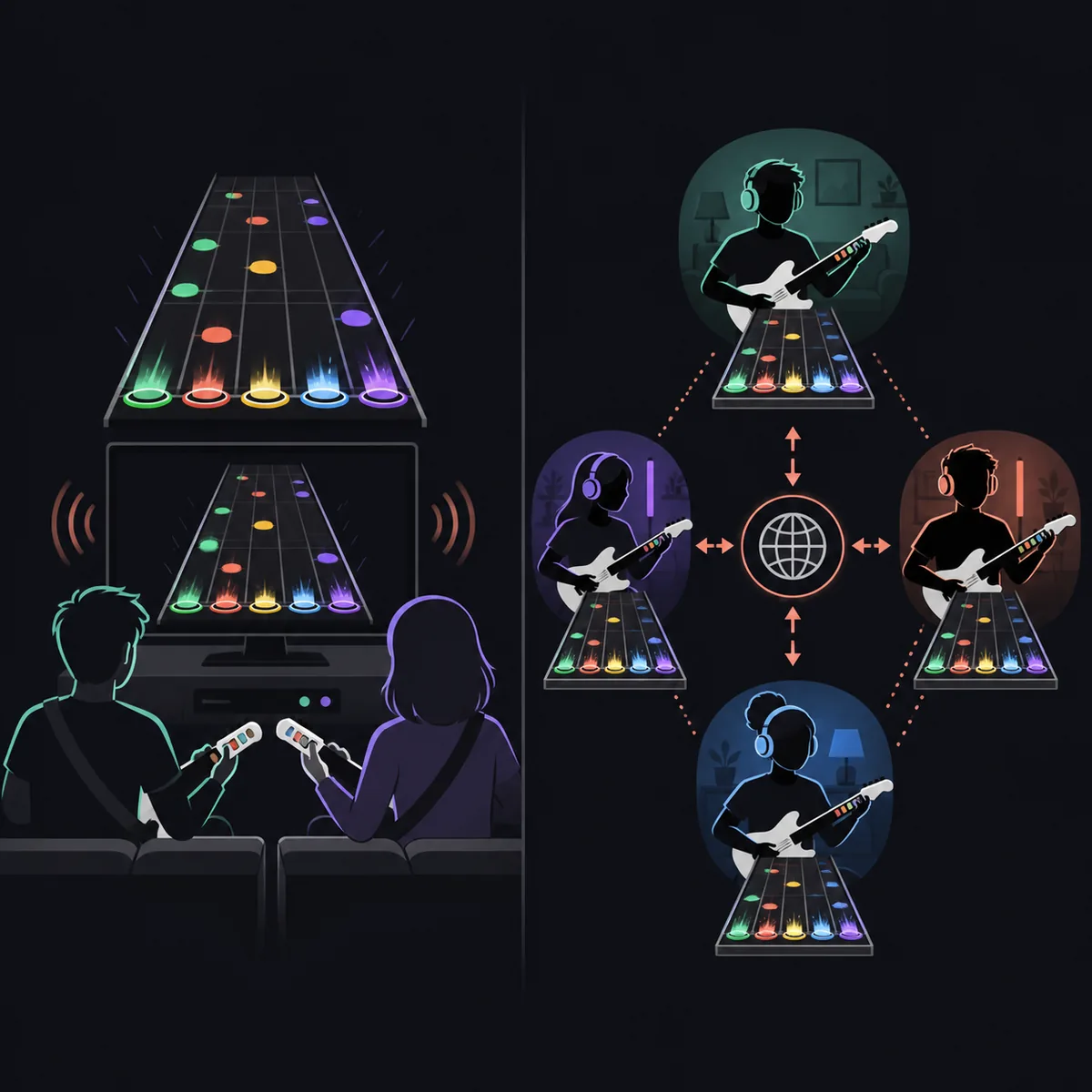
The diagram below is an editorial explanation, not an official game screenshot. It shows why local play keeps the session on one computer while online play adds a network path between separate players.
| Choice | Advantages | Common failure |
|---|---|---|
| Local | Fast input testing and shared audio | One controller is mapped twice or the computer cannot handle all inputs |
| Online with a direct host | Lower extra routing when the host is reachable | Router, firewall or carrier-grade NAT blocks the connection |
| Online with a relay | Useful when direct hosting is difficult | Higher latency or a service/region issue affects the session |
| Remote play or screen-sharing workaround | May help a group that cannot use the normal flow | It is not the same as native multiplayer and can add input delay |
What every player must match before joining
Fix the shared content and input layer before diagnosing the network layer.
Start by checking the exact version shown by every installation. The official release currently recorded for this guide is v1.1.0.6142, but the publisher's release page remains the authority if a newer build appears. The update and migration guide explains how to back up Songs, Custom and settings before changing an installation.
Next, choose one small test chart that every player can load. The title, chart version, instrument and difficulty should be clear. A pack that contains multiple versions of a song can produce confusing results when one person selects a different chart folder. If the file is missing for one player, compare the folder contents and configured song path rather than asking the host to reinstall the game.
Finally, map the input before joining. A keyboard, gamepad, guitar or drum kit can be useful, but each device must be assigned to the intended player. Use the Clone Hero controller guide for receiver, mapping and calibration checks. Do not wait until the room is full to discover that two devices send the same buttons.
- The same official game version or a version combination confirmed by the current release notes.
- The same chart title, instrument, difficulty and compatible song package on each computer.
- A tested input device for every player, with unique mapping and stable calibration.
- A backup of Songs, Custom and settings before updating or moving a large library.
- A way to contact the host while testing so one change can be checked at a time.
How to host or join with a friend
The labels can vary between builds, but the safe order is stable: update, test a chart, create the room, share the connection details, let the friend join and only then select the song. Avoid changing the chart, input mapping and network mode at the same time because you will not know which change fixed or caused the problem.
For online sessions, the official Wiki describes an automatic host path using UPnP, a direct connection option and a relay server option. Automatic hosting is convenient when the router supports it. A direct host may need the operating system and router to allow the game's traffic. A relay can be a practical fallback when the host is not directly reachable, but it can behave differently depending on load and distance. Read the official multiplayer instructions for the current field names and server details.
When a friend cannot join, ask for the exact point of failure: no room appears, the join attempt times out, the player enters but sees no chart, or the song fails to start. Each symptom points to a different layer.
- 1
Update and launch once
Confirm the version on every installation, open the game and play one local chart. Back up Songs, Custom and settings before replacing an older folder.
- 2
Pick a known-good chart
Choose one song that appears for every player with the same instrument and difficulty. Do not begin with a large pack or a chart that has not been tested locally.
- 3
Create the session
Open the current multiplayer mode and choose the host path available to your group: automatic host, direct connection or relay. Keep the host's connection details visible.
- 4
Share only the required details
Send the room code, address or server information through a private channel. Do not post personal addresses or router details in a public community thread.
- 5
Join and verify players
The joining player should confirm that the name, input device and chart are visible before the host starts a song. Fix a missing player at this stage.
- 6
Start a short test
Use a familiar chart and a normal difficulty. If the session passes the short test, move to a longer song or a larger setlist one change at a time.
Own server, relay, and connection limits
A private session with a friend and a publicly operated server are different responsibilities. A friend-hosted room is usually the smallest surface area: one person hosts, the others join, and the group can stop if the connection is unstable. A dedicated or self-managed server may help a regular group, but it adds configuration, availability and privacy decisions that are outside the basic game download.
If direct hosting fails, check whether the router uses carrier-grade NAT, whether the operating system firewall blocked the game, and whether the selected port or host mode is supported by the current release. Do not disable security software broadly just to test one button. Prefer a narrow allow rule, a documented relay path or the official community guidance.
Online play also has a practical content limit: the room cannot make a missing chart appear. If a player joins successfully but cannot select the song, return to the shared chart check. Use the songs guide for source and metadata checks, then use ZIP vs SNG when the package format is the source of confusion.
Start a song and keep the session stable
The official v1.1 media below shows a versus-style score view with separate player totals and a live difference. It is useful context for the multiplayer experience, but it does not prove that your network is configured. The first live test should still be a familiar chart that everyone can play locally.
Once the room is ready, avoid last-second changes to the song folder, chart difficulty or controller mapping. If one participant needs a different instrument, make that choice before the host starts the song and confirm that the selected chart contains that instrument. A stable session is easier to diagnose when the group changes one variable at a time.
If the song does not start, capture the exact visible message and note whether everyone can return to the room. The phrase start song in multiplayer describes several different failures: a missing chart, a host-side selection problem, a stalled connection or an input device that never joined the player list.

- Use a short, familiar chart for the first test.
- Confirm player names, instruments and difficulty before starting.
- Keep the same chart folder on every computer while testing.
- Record the exact error and the player who saw it.
- Change one setting at a time, then repeat the same short test.
Troubleshooting missing players, songs, or start buttons
Use the symptom, not the most dramatic possible fix. Reinstalling the game can remove the evidence you need and will not repair a missing chart or a blocked host. First decide whether the failure happens before joining, after joining or only when the host starts the song.
If the symptom is broad across every song or every controller, pause the multiplayer test and use the general troubleshooting guide. If only one chart is affected, inspect that chart's folder, metadata and audio. If only one input device is affected, compare its mapping with a known-good player through the controller guide.
The table below is a first-pass decision tree. It is intentionally conservative: a version check, one chart and one controlled network change are safer than a full library migration during a live session.
| Symptom | Likely layer | Next check |
|---|---|---|
| Room never appears | Host mode or reachability | Confirm the selected host/relay mode, firewall rule and current release instructions |
| Join times out | Router, NAT or relay | Test a relay or a different host path; do not publish private network details |
| Player joins but has no song | Song path or chart mismatch | Compare chart folder, instrument, difficulty and Scan Songs result |
| One controller is invisible | Input mapping | Check device assignment, receiver and calibration before changing the network |
| Host cannot start the song | Selection or shared content | Use a known-good chart and confirm every player has it |
| Session starts with delay | Connection or relay distance | Test a shorter chart, reduce background traffic and compare direct versus relay behavior |
Small habits that prevent multiplayer failures
Keep a small multiplayer test folder instead of making a giant library the first thing your friends load. One known-good chart makes it obvious whether a later failure came from the network or from a new pack. After the group has a stable session, add more content in controlled batches and scan each computer.
Back up the host's settings and personal folders before the next update. The update guide explains the safer migration order, while the leaderboards guide covers a separate score-verification workflow. Keeping those tasks separate prevents a missing online result from being mistaken for a multiplayer connection failure.
Finally, keep the group instructions short: which version to use, which chart to test, who is hosting, which connection path to try first and where to report the exact error. A repeatable checklist is more useful than changing five settings at once.
Version freshness and official sources
This guide was checked on August 6, 2026 against the official Clone Hero release listing, the official v1.1 release notes, the official Wiki multiplayer guide and the official GitHub release. The verified version remains v1.1.0.6142, released June 1, 2026. The site did not find a newer official version than the one already recorded on the homepage, so no older download buttons were silently replaced while this page was added.
Use the official release listing and the official GitHub release when you need to verify a package. This page does not promise a third-party server, a permanent mirror or a security scan that has not been published. If the publisher changes the multiplayer workflow, follow its current release notes before changing router or server settings.
Clone Hero multiplayer questions
Is Clone Hero multiplayer?
Yes. The current v1.1 release supports multiplayer play, with a different setup for local sessions and online sessions. Start with the official release notes and the current Wiki instructions if menu labels change.
How do I play Clone Hero multiplayer with a friend?
Update both installations, test the same chart locally, create a host session, share the required room or connection details privately, let your friend join and verify the player and chart before starting a short song.
Can I play Clone Hero multiplayer online?
Yes, when the current game build and connection path support the session. The official guide describes automatic hosting, direct connections and a relay option; the best choice depends on router reachability and the current release behavior.
Why can my friend join but not see the song?
A successful connection does not copy your song library. Compare the chart folder, song.ini metadata, audio, instrument, difficulty and configured song path on both computers, then run Scan Songs.
Why will Clone Hero not start a song in multiplayer?
Check the selected chart and instrument first, then confirm every player has the same compatible chart. If the room itself is unstable, return to a one-player local test and isolate the network or host problem.
Do all players need the same Clone Hero version?
Use the same current official version whenever possible. A version mismatch can change available menus or session behavior, so compare the release identifier before debugging the router.
Can I run my own Clone Hero multiplayer server?
A private host or a documented server path may be possible depending on the current release, but it adds networking, availability and privacy responsibilities. Follow official documentation and do not download an unknown executable advertised as a server.
Is multiplayer the same as Clone Hero leaderboards?
No. Multiplayer is about playing together in a session. Leaderboards are a separate score-submission and verification workflow, so a missing leaderboard result should be diagnosed through the leaderboard guide rather than by changing the multiplayer host.
Sources and verification
Official sources are listed for release behavior and online multiplayer terminology. The explanatory flow image is editorial and not an official game screenshot.