
Clone Hero Spreadsheet Guide
A Clone Hero spreadsheet can organize song charts, setlists and project links, but it is an index rather than an official download store. This guide explains how to identify the maintained source, avoid stale copies and move a verified chart into the game.

Use a spreadsheet to discover releases, then verify the destination
The phrase Clone Hero spreadsheet usually refers to a community-maintained list of songs, setlists or chart projects. Clone Hero's official account promoted a master song spreadsheet in 2017, but copied sheets and old links still circulate. Treat every row as a pointer: check the owner, last update, charter or project page, instruments, format and final host before downloading.
For individual chart search, Chorus Encore is usually faster than browsing a large sheet. For curated collections, use a documented pack or setlist page. Never run an unknown EXE to obtain a chart, and do not assume a file is official because it appears in a popular spreadsheet.
What a Clone Hero spreadsheet actually is
A spreadsheet organizes links and metadata; it does not make every linked file current, licensed or safe.
Community sheets became useful because Clone Hero charts are distributed across many projects, charters and storage hosts. A row may identify an artist, song, source game, charter, instruments, difficulty coverage, pack name and download destination. That structure makes a sheet valuable for browsing a legacy setlist or a themed collection that is difficult to discover one song at a time.
The word “master” can be misleading. It may describe the scope intended by a maintainer, not an official or permanently complete catalog. Clone Hero does not include every Guitar Hero or Rock Band song, and a spreadsheet cannot grant rights to commercial audio. It can also outlive the person who maintained it, leaving working-looking rows that point to removed files, private drives or replaced releases.
Start by identifying where the sheet came from. An official Clone Hero social post can verify historical context, while a current project page or named community maintainer provides the practical update trail. A copy hosted by an unrelated document site with no owner, changelog or source links should not outrank the original project merely because it appears higher in search results.
| Resource | Best use | Strength | Main limitation |
|---|---|---|---|
| Community spreadsheet | Browsing setlists, projects and historical collections | Many releases can be compared in one view | Copies, dead links and unclear update ownership |
| Chorus Encore chart search | Finding an individual artist or song | Searchable chart metadata and alternate versions | Not every curated pack is best understood as separate rows |
| Project or event page | Downloading one maintained pack | Release notes, credits and a defined track list | Covers only that project |
| Anonymous mirror or complete-library claim | No recommended use | May appear convenient | Weak provenance, stale files, copyright and malware risk |
How to verify a Clone Hero songs spreadsheet
Check the document and the linked destination separately. A tidy row is not proof that the final file is trustworthy.
- 1
Confirm the owner and update trail
Look for a named project, community group or maintainer, plus a visible last-updated note or changelog. Prefer the source linked by that project over a copied sheet with no history.
- 2
Read the row before opening the file
Check artist, title, charter, instruments, difficulty, pack or setlist, format and any version notes. Similar titles can lead to different charts and audio sources.
- 3
Inspect the final host
Follow the row to the original release page when available. Avoid shortened or multi-step redirects that hide the destination, and cancel if the page asks for an extension, downloader or unrelated account.
- 4
Compare duplicate versions
Use charter credits, supported instruments, full-difficulty status and release date to select one version. Do not install every duplicate and decide later after the library is cluttered.
- 5
Test one chart or pack first
Download into a staging folder, inspect the archive, add one controlled batch and scan immediately. This makes a bad file or outdated row much easier to isolate.
What should be inside a spreadsheet song download
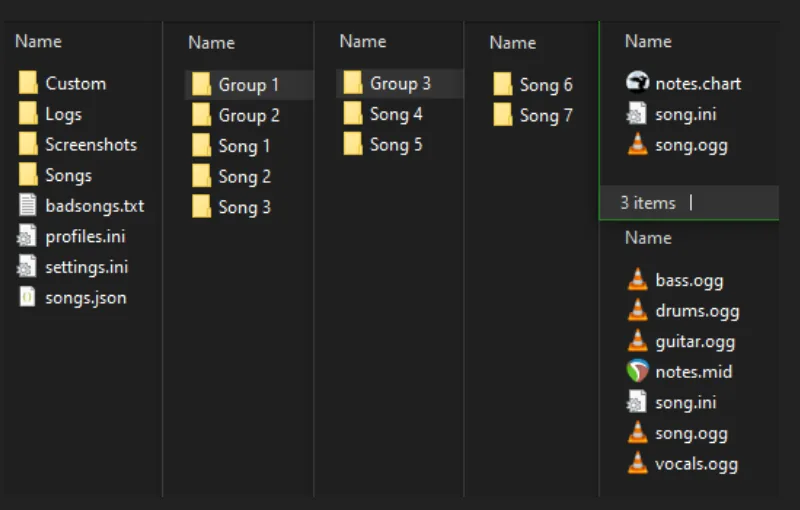
A normal Clone Hero song arrives as a ZIP, RAR, 7z or SNG package, not as a general-purpose installer. After extracting an archive, the actual song folder should contain chart data such as notes.mid or notes.chart, metadata in song.ini, and at least one supported audio file. Separate guitar, bass, drum or vocal stems may also be present.
Keep every song's files together. Spreadsheets often link to large packs with group folders, which is fine, but the final directory tree must still lead to individual song folders. Do not flatten an entire pack into one directory, and do not leave nested ZIP files unopened inside the active Songs path.
The official Clone Hero Wiki image below shows how group folders can lead to individual song directories. Use it as a structure check, not as a promise that every spreadsheet download will use identical names.
- Expected: song.ini plus notes.mid or notes.chart.
- Expected: song audio or separated instrument stems.
- Optional: album art, backgrounds, video and lyrics.
- Warning: an unknown EXE, browser extension or password-unlock tool.
- Warning: a file whose title does not match the spreadsheet row or release page.
From a spreadsheet row to a working Clone Hero song
Open the row's original project or chart page, read its notes and download the documented package. Keep it outside the live library while it downloads. Extract ordinary archives until the real song folders are visible; leave an SNG file intact when your current workflow supports that format.
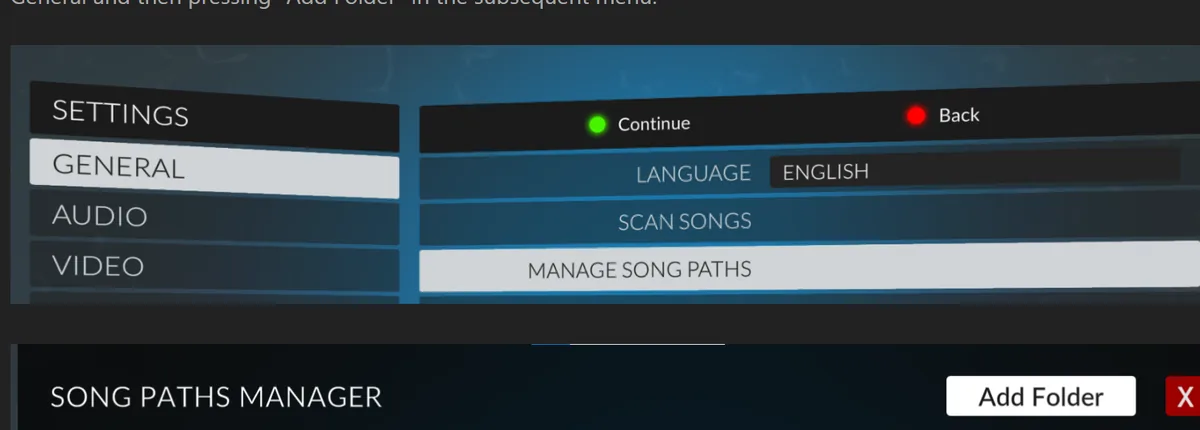
Move the verified folder or pack into the default Songs folder or another configured song path. Clone Hero does not automatically refresh the library after every file change. Open Settings, choose Scan Songs and wait for the result before importing another batch. If the bad-song count increases, inspect badsongs.txt and repair or remove that batch.
The official Wiki screenshot below shows Scan Songs and Manage Song Paths. Use the in-game controls instead of relying on a path copied from an old video, because the correct location varies by operating system and installation mode.
| Symptom after import | Likely cause | Next check |
|---|---|---|
| Song never appears | Library was not rescanned or path is wrong | Run Scan Songs and confirm the configured folder |
| Bad-song count increases | Missing chart, audio or metadata | Read badsongs.txt and inspect the exact song folder |
| Two copies appear | Duplicate chart versions or repeated song paths | Remove one copy and scan again |
| Pack is still one archive | ZIP/RAR/7z was not extracted | Extract outside the library, then move the song folders |
| Download opens an installer | Wrong or unsafe destination | Cancel and return to the original release or chart page |
What to do when a spreadsheet link is dead or outdated
Do not search the filename and choose the first mirror. Return to the named project, charter, event or community group and look for a replacement release. Then search a current chart index by artist and title. A new chart may use a different filename, format or host, so matching metadata matters more than reproducing an old URL exactly.
If a row points to an older chart, compare the replacement before deleting a working copy. A newer upload may fix timing, add instruments or change audio, but it may also be an alternate chart rather than a direct update. Preserve credits and record which version you installed so future duplicate cleanup is possible.
Report dead rows to the maintainer when a contact or contribution process is visible. Do not request access to a private drive repeatedly, edit a view-only sheet without permission or upload someone else's pack to a new mirror. A broken link is not permission to redistribute the files.
Copyright, mirrors and complete-library claims
Chart data and commercial song recordings are different works. A community spreadsheet can help players discover authored charts, but it does not automatically authorize every linked audio file in every country. Follow project notices, removal requests and the rules that apply to recordings you access.
Avoid paid hard drives, torrents, modified game bundles and pages advertising “every Clone Hero song.” These offers frequently erase charter credits, mix old and duplicate files, hide the source of commercial audio or include software unrelated to the game. The official Clone Hero download is separate from community songs.
This guide does not host a master spreadsheet copy or song archive. It explains how to evaluate indexes and sends readers to current source pages. For individual discovery, continue to the Clone Hero songs download guide; for large collections, use the song packs guide.
Clone Hero spreadsheet questions
Where is the official Clone Hero spreadsheet?
Clone Hero's official social account promoted a master song spreadsheet in 2017, but old copies and links now circulate. Verify the current owner and destination instead of assuming every document with that title is official or maintained.
Is a Clone Hero songs spreadsheet safer than a search site?
Not automatically. A spreadsheet is useful for organization, while a searchable index is often better for individual songs. In both cases, review the final host, chart metadata, file type and project source.
Can I download every row at once?
Avoid it. Large uncontrolled imports make dead links, duplicates, bad charts and storage problems difficult to isolate. Install one documented pack or small batch, scan and test before continuing.
Why does a spreadsheet link request access?
The owner may have made the file private, replaced it or reached a host limit. Look for the original project and a current release; do not use an anonymous mirror simply to bypass access controls.
How do I add custom songs to Clone Hero after downloading them?
Extract ZIP, RAR or 7z packages, confirm the song folder contains chart, metadata and audio files, move it to a configured song path, then run Scan Songs. Read badsongs.txt if it is rejected.
Are Clone Hero spreadsheets legal?
A link index can be lawful, but each chart, recording and redistribution has its own rights context. A spreadsheet does not grant permission for commercial audio or unauthorized mirrors.
Sources and verification
Facts and download destinations were checked on July 20, 2026.