Clone Hero Leaderboards: How Scores and Submissions Work
Clone Hero leaderboards connect a playable chart, a recorded run and a verifier that turns the result into a visible score. This guide explains the v1.1 path, how to read player and song rankings, what to prepare before submitting and how to troubleshoot a missing result without confusing a leaderboard problem with a song-library problem.
Use the official v1.1 flow, then wait for verification
The official Clone Hero v1.1 release introduced an in-game Leaderboards mode and a separate CH Leaderboards website. Start from a current official build, play a chart that your installation can load normally, open the leaderboard feature from the game, and let the submission verifier process the run. The official v1.1 release guide is the source of truth for the feature and its current entry points.
A leaderboard is not a song-download service. If the chart is missing, uses the wrong instrument or fails Scan Songs, fix the library first through our song installation guide. If the game itself is old or the update path is unclear, use the Launcher and update guide before repeating a submission.
What Clone Hero leaderboards show
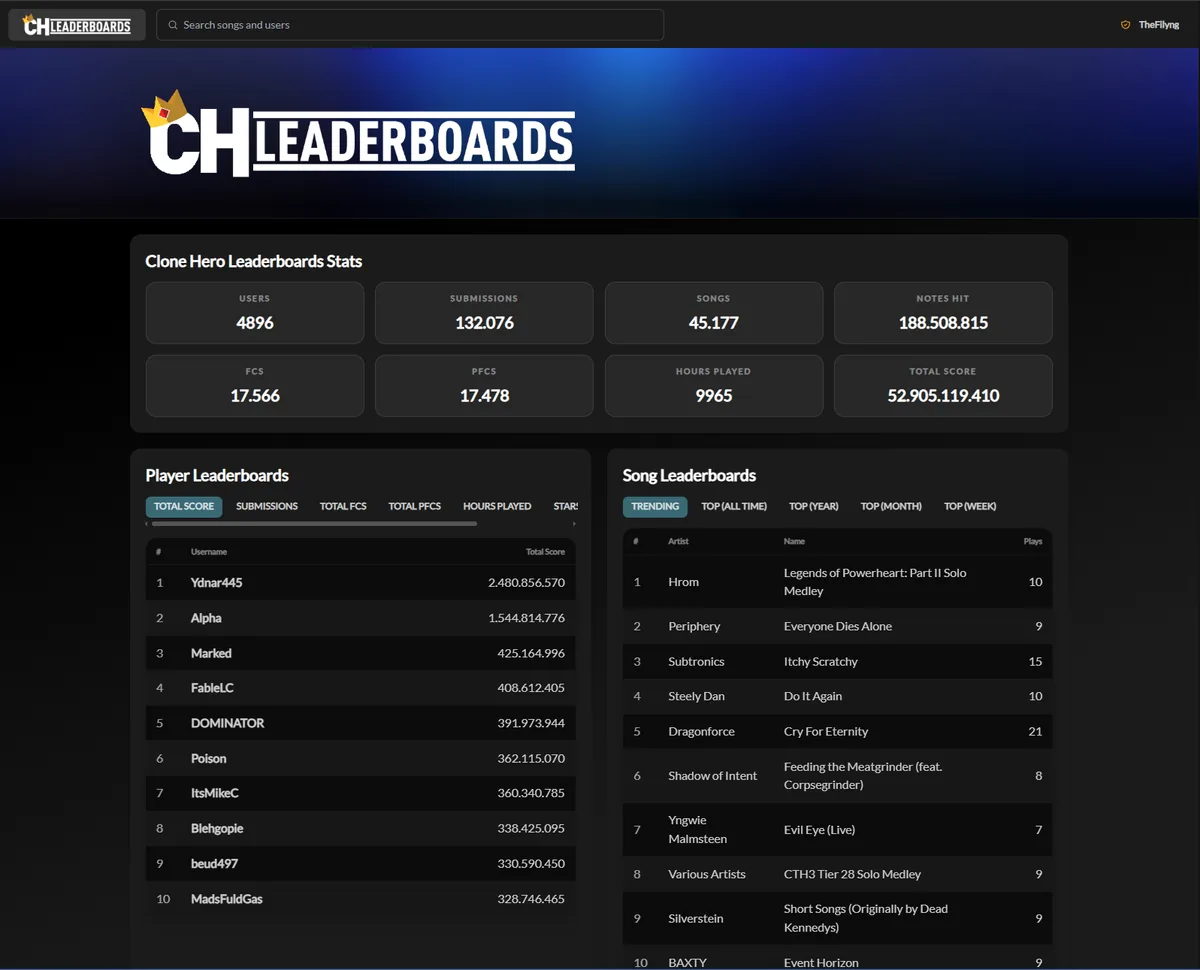
The public site combines player-level totals with song-level rankings, so the same run can be understood from two different directions.
The homepage presents aggregate statistics and separate panels for Player Leaderboards and Song Leaderboards. Player views help you compare a profile across totals such as score, submissions or full combos. Song views help you inspect how different players performed on one chart. These are related views, not two copies of the same ranking.
Search the site by song or user when you want a specific result. A row is meaningful only when you also know the chart, instrument, difficulty and any visible modifiers. A high number without that context is not enough to decide whether two performances are directly comparable.
| View | Useful question | Read alongside |
|---|---|---|
| Player leaderboard | How is one profile performing across the library? | Total score, submissions, FC/PFC totals and hours played |
| Song leaderboard | Who has the strongest visible run on this chart? | Song title, instrument, difficulty, score and accuracy |
| Submission or song page | What does one chart's result set contain? | Player, score, accuracy, misses, ghosts and modifiers |
| Profile or search | Where can I find a player's history? | Exact username and the current public profile link |
The leaderboard flow from update to rank
A clean submission is easier when each layer is tested in order. Do not start by changing account settings or reinstalling the game because a score is absent. First confirm the installed build, then confirm that the chart plays locally, then open the leaderboard mode and review the result after verification.
The illustration below is a non-official explanatory diagram. The real interface and score fields are shown in the official screenshots later in this guide.
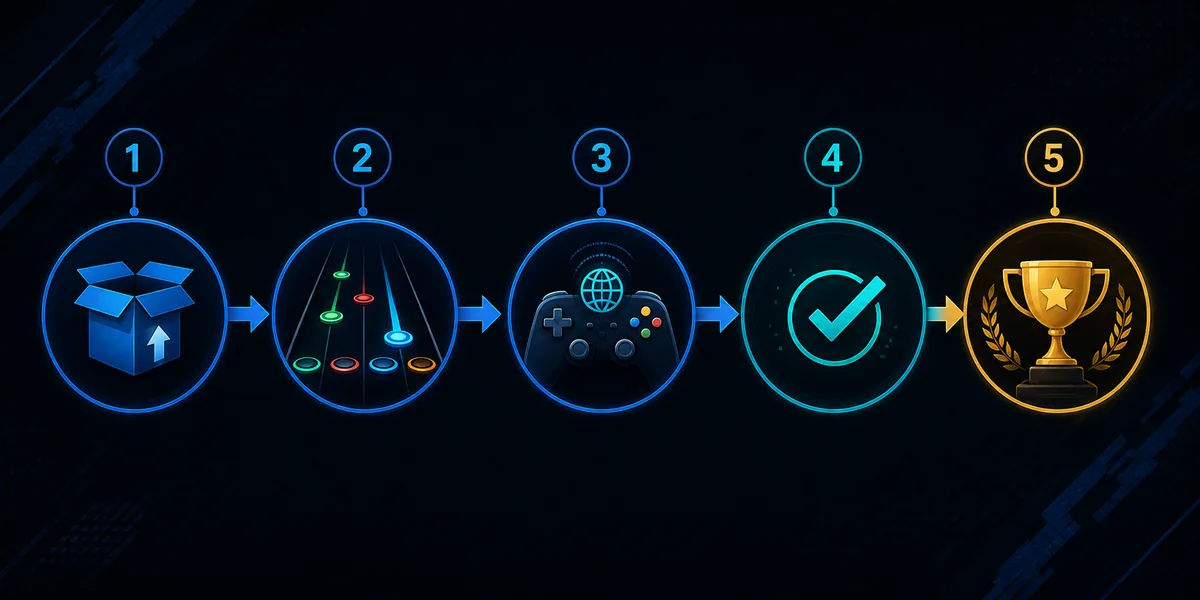
- 1
Use a current official build
Check the official release page and keep your version record. The site was verified against v1.1.0.6142 on August 1, 2026; a newer publisher release should take priority in the future.
- 2
Play one known-good chart
Use a chart that already appears in the game, has the intended instrument and difficulty, and completes normally before you test the submission path.
- 3
Open Leaderboards
Use the in-game Leaderboards mode or the official website entry point described by the release guide. Keep the exact player profile and chart context visible while testing.
- 4
Let the verifier process the run
A score may not appear instantly. Wait for the submission to be processed before assuming that the run failed or that the leaderboard is broken.
- 5
Compare the published row
Search the song or profile and compare instrument, difficulty, score, accuracy and modifiers. Save the source and version notes if you need to report a problem.
What to prepare before submitting a score
Most leaderboard confusion is caused by a mismatch between the run and the page used to inspect it. Prepare a small, reproducible test rather than submitting a whole library at once. This also makes it easier to tell whether a problem belongs to the chart, the controller, the game build or the verifier.
The current release and official feature pages should be treated as authoritative. Community chart sources remain useful for discovery, but they do not automatically define how a score is ranked or whether a chart version is equivalent to another upload.
- A current official Clone Hero build and a note of the version used for the run.
- A chart that loads and plays locally, with its song title, chart source and instrument recorded.
- The intended difficulty and a controller/profile that already works in normal gameplay.
- A stable song path and a completed Scan Songs step when the chart was newly added.
- The exact username or profile context used when you inspect the published result.
- One test run first; do not submit a large batch while the first result is still unverified.
How a score submission appears on the site
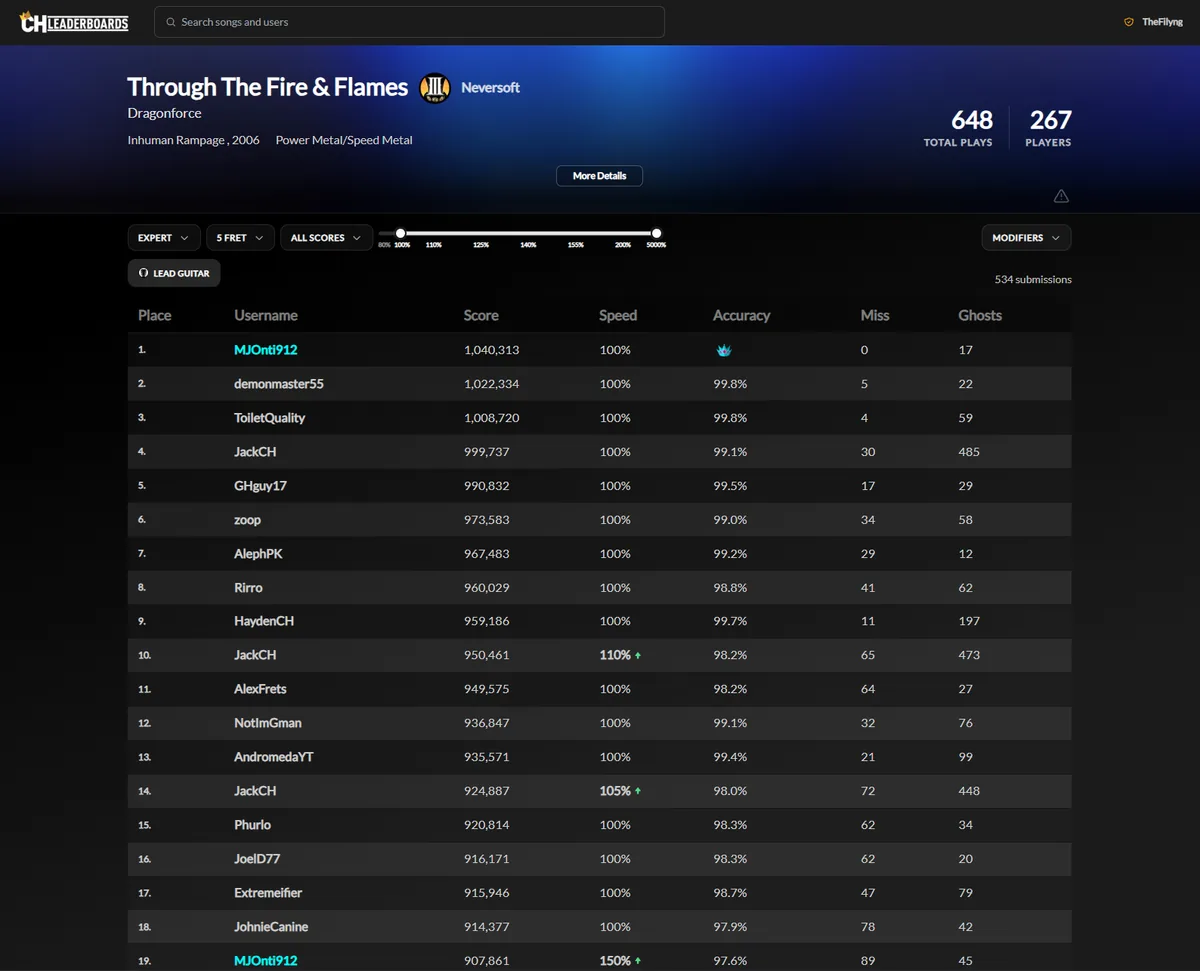
The official submission view shows a song page with filters for difficulty, instrument, score range and modifiers, followed by rows containing place, username, score, speed, accuracy, misses and ghosts. Use those fields to describe what you see; saying only “my score is missing” leaves out the information needed to reproduce the check.
The screenshot below is official media from the v1.1 release article. It is useful as a field map, not as a promise that every chart has the same number of submissions or the same visible settings.
- 1
Choose the exact song
Search by the title shown in the game and confirm the artist or chart identity. Similar titles can point to different charts or releases.
- 2
Match instrument and difficulty
A lead-guitar result is not the same comparison as drums, bass or another difficulty. Recheck the filters before deciding that a ranking is wrong.
- 3
Review the row after verification
Look for your username, score and accuracy after the verifier has processed the submission. Refreshing repeatedly before that stage can create a false failure report.
- 4
Capture a useful report
Write down version, operating system, chart source, instrument, difficulty, approximate run time and the exact page or filter state. This is more useful than a cropped score number alone.
How to read scores, accuracy and PFC results
The game and site can show more than one signal for a performance. Score is the numeric result; accuracy describes how closely the notes were hit; misses and ghosts provide additional context. A full combo or perfect full combo marker is meaningful only within the same chart, instrument and difficulty context.
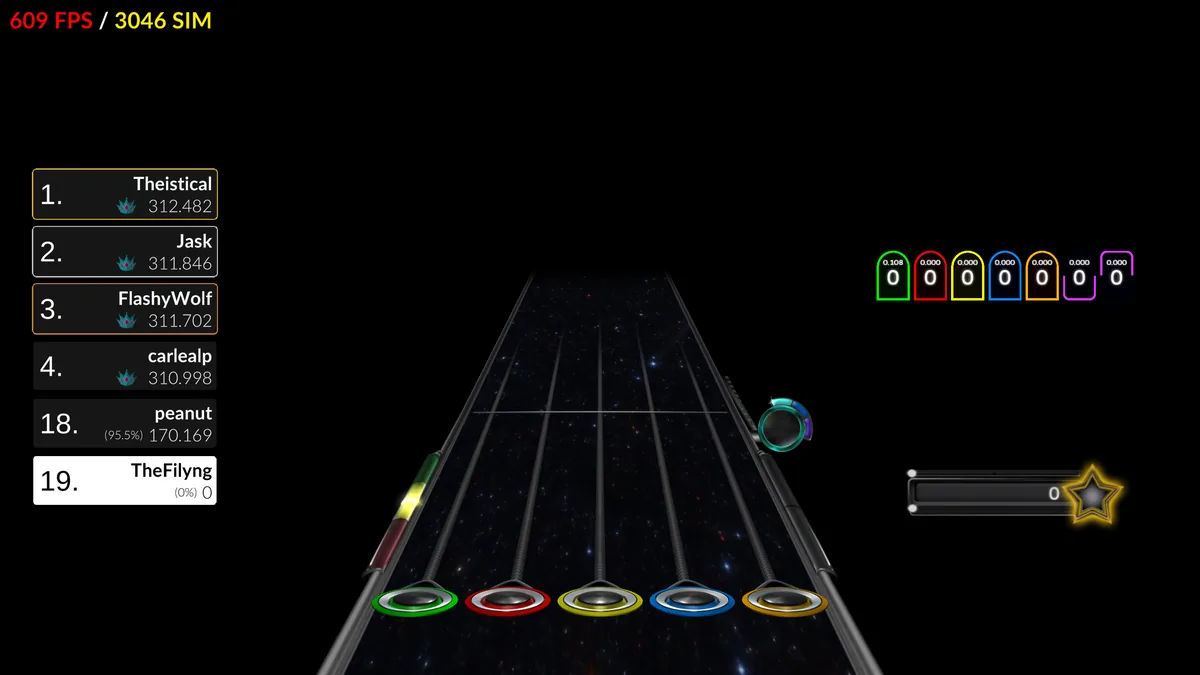
The official gameplay image below shows the in-game leaderboard overlay alongside the highway. Treat it as a live comparison layer, not as a replacement for the published song page. If the overlay and the website appear different, first check whether you are viewing the same chart version and filter set.
| Signal | What it helps explain | What not to assume |
|---|---|---|
| Score | The numeric result used by the visible ranking | A larger number is not automatically comparable across different charts |
| Accuracy | How consistently the notes were hit | The same accuracy can still come from different note patterns or modifiers |
| Misses / ghosts | Where a run lost precision or used a different hit pattern | A small count alone does not identify the chart version |
| FC / PFC marker | Whether the visible run met the relevant combo condition | A crown or marker is not proof that two uploads are the same chart |
| Speed / modifiers | Whether the row was filtered or played with a visible setting | Do not compare rows until the modifier context is understood |
Fix common Clone Hero leaderboard problems
Start with the smallest failing layer. If the chart does not appear in the game, use Scan Songs and inspect the chart files. If the chart plays but the controller is unreliable, follow the controller guide. If the game or Launcher is outdated, follow the general troubleshooting guide and the official update instructions before repeating the run.
Do not claim that a delay, missing row or rejected run proves a ban, a broken chart or a bad account. Record the evidence and give the verifier time to finish. If the official service changes its rules, its release notes and leaderboard page take priority over this guide.
| Symptom | Likely layer | Next check |
|---|---|---|
| The leaderboard page is empty | Search/filter state or service response | Clear filters, search the exact song or username and retry after the verifier window |
| The song plays but no score appears | Pending verification or chart context | Wait, then compare title, instrument, difficulty and profile |
| The score appears under another context | Different chart, instrument or difficulty | Match the song metadata and filter settings before reporting a mismatch |
| The chart cannot be played | Song path, archive structure or missing files | Use the song-install guide, run Scan Songs and inspect badsongs.txt |
| The run is hard to reproduce | Controller or profile instability | Test one controller/profile and use the dedicated mapping/calibration checks |
| The game is on an old build | Version or migration path | Back up Songs and Custom, then follow official release/update guidance |
| A page asks for an unrelated installer | Unsafe mirror or misleading download | Leave it and return to the official site or the named chart project |
Leaderboard data, chart sources and privacy boundaries
Leaderboards make performance data visible, but they do not turn every community chart or recording into an official release. Keep the chart source, charter credit and version context when you build a library. The song packs guide is useful for larger collections; this page is about score context after a chart is already playable.
Use the official CH Leaderboards page for the current public interface and the official release notes for feature changes. Avoid asking anonymous mirrors to repackage a game, chart collection or account data. A leaderboard guide should help you verify the path, not encourage uploads of files you are not permitted to share.
When reporting an issue, share only the public information needed to reproduce it. Do not publish passwords, private tokens or unrelated personal data. The site can explain the public workflow, but it cannot manually approve, delete or repair another service's score record.
Clone Hero leaderboard questions
What are Clone Hero leaderboards?
They are the v1.1 score-ranking feature and companion CH Leaderboards website for comparing player and song results. They are separate from downloading the game or finding community songs.
Do I need the latest Clone Hero version to use leaderboards?
Use the current official build and check the release notes before submitting. The site was verified against official version 1.1.0.6142 on August 1, 2026; a newer official release should take priority later.
Why is my Clone Hero leaderboard score missing?
The submission may still be waiting for verification, or the page may be filtered to another song, instrument, difficulty or user. Wait for processing, clear filters and compare the exact run context.
Can I submit any Clone Hero chart to the leaderboard?
Do not assume that similarly named charts are interchangeable. Use a chart that plays normally, keep its source and metadata, and check the official release or leaderboard documentation for current acceptance rules.
Do leaderboards download songs for me?
No. Leaderboards are for score and ranking context. Find charts through a documented community source, install them into a configured song path and scan them before trying to submit a run.
What does PFC mean on a Clone Hero leaderboard?
PFC means Perfect Full Combo in the visible chart context. Read it together with song, instrument, difficulty and any modifiers rather than treating the marker as a universal comparison.
Can I use a keyboard or gamepad for a leaderboard run?
Use the controller or input setup supported by the current official workflow and make the device stable before submitting. If the input is unreliable, fix mapping and calibration first instead of blaming the chart or verifier.
Sources and verification
Facts and download destinations were checked on July 20, 2026.